
Outbound workspace
Find prospects. Start conversations. Manage outreach.
Find the businesses you sell to, draft an email that sounds like you, send it from your own address, and see every reply come back sorted. One workspace, for one person or a small team. Nothing sends without you.
Plans from $149 a month. Fourteen-day money-back guarantee, cancelled from your own Plan page. Already a customer? Sign in.
The problem
Outbound Is Twelve Small Jobs, Not One
Prospecting rarely stalls because someone is unwilling to do it. It stalls because it is spread across a spreadsheet, an inbox, a browser with fifteen tabs open, and a memory of who was supposed to hear back last Tuesday.
Lead Center puts those steps in one place and takes the repetitive ones off your desk.
- Finding businesses worth contacting in the first place
- Keeping names, addresses, and notes straight across spreadsheets
- Researching enough about each one to write something personal
- Writing the email, then writing forty more like it
- Sending, and remembering what you sent to whom
- Noticing who replied, and who has gone quiet and needs a nudge
A look inside
The Workspace, Not a Mockup
These are real screens from a working Lead Center, with sample leads.
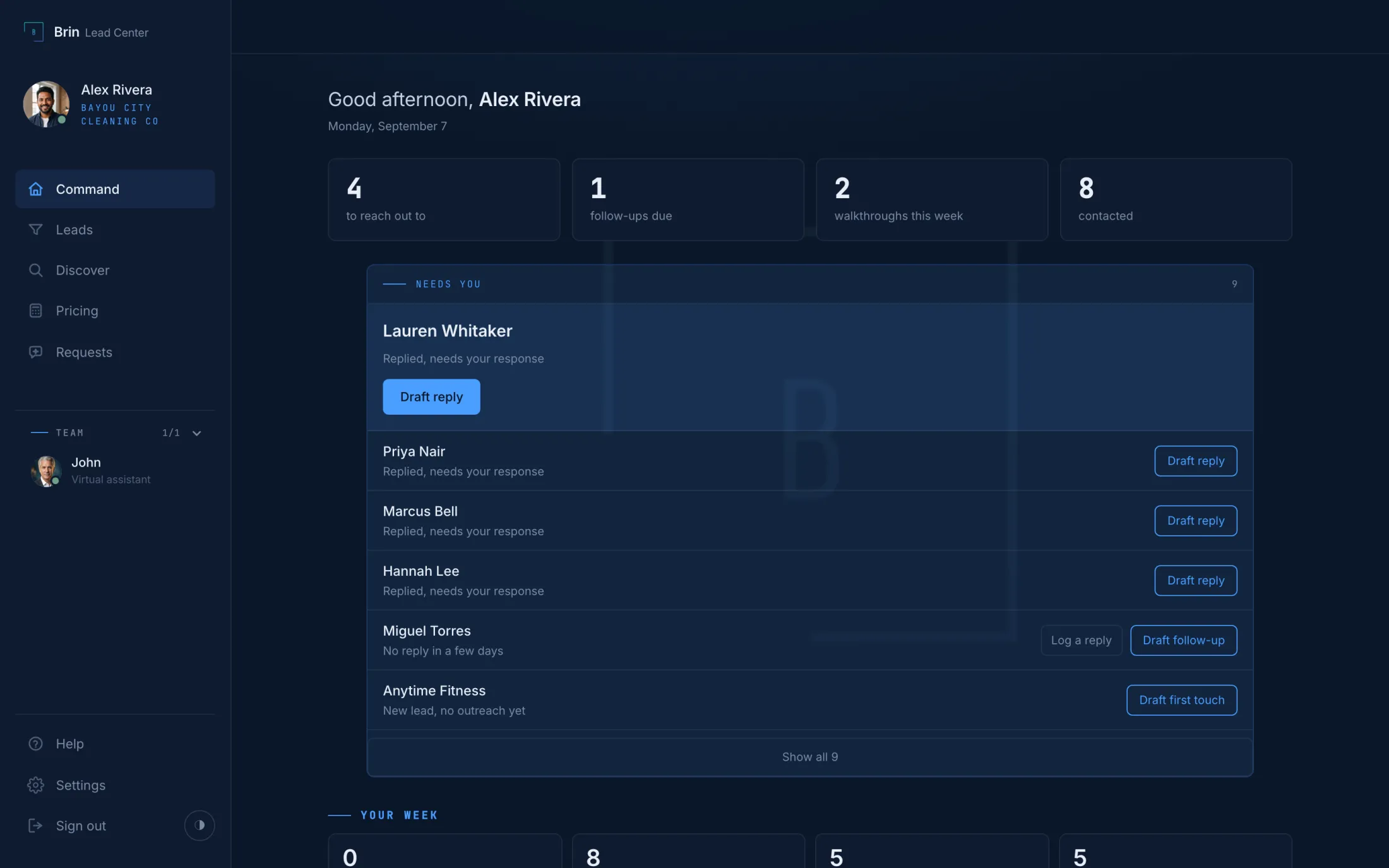
Command
Open It and Know What to Do
Replies to answer, follow-ups due, new leads waiting, in one list with one button each. The rest of the pipeline stays out of the way until you want it.
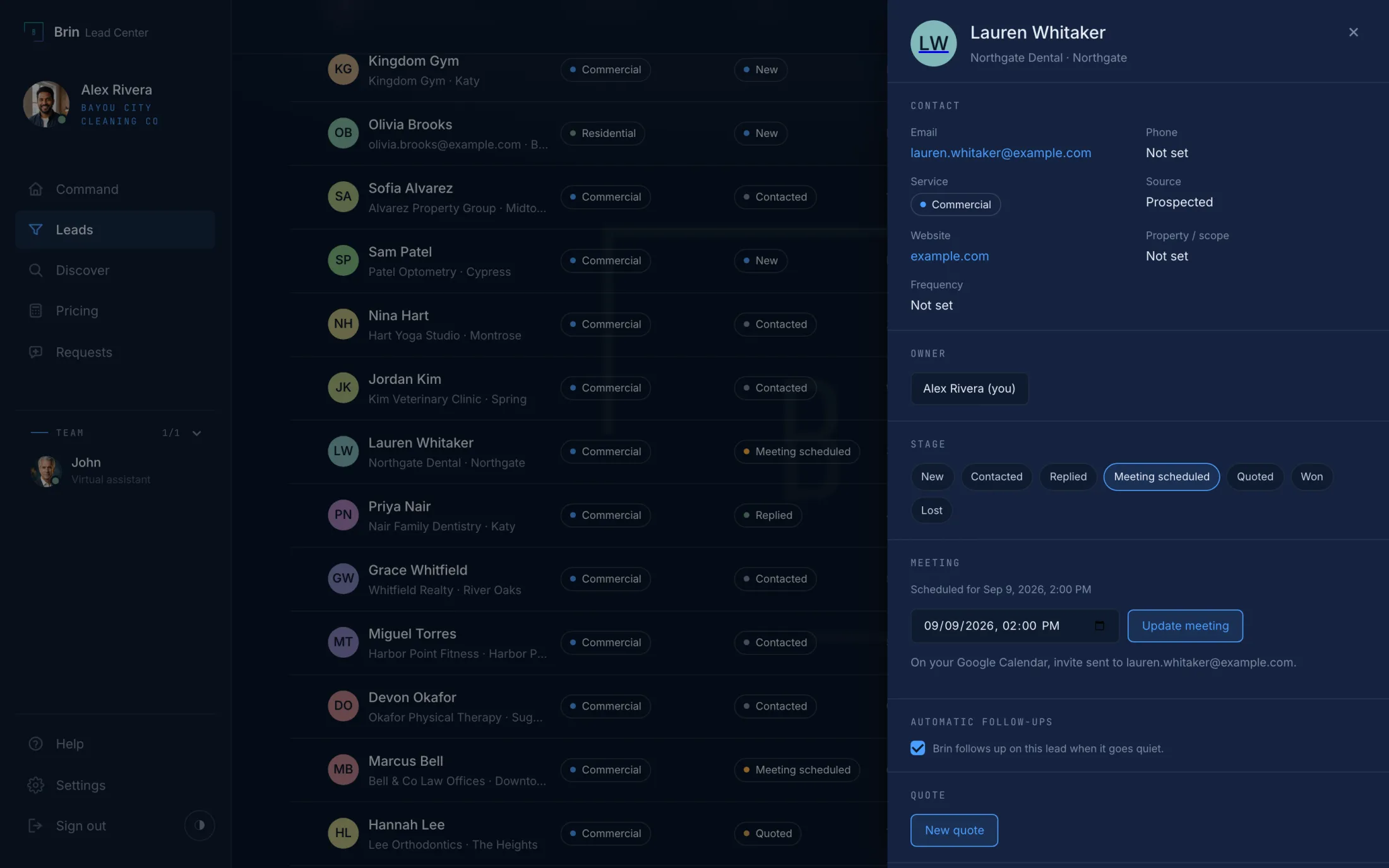
The lead
Everything About One Business, on One Panel
Contact, stage, quote, the meeting on your calendar, the whole conversation, and the composer that drafts in your voice. Nothing sends until you press Send.
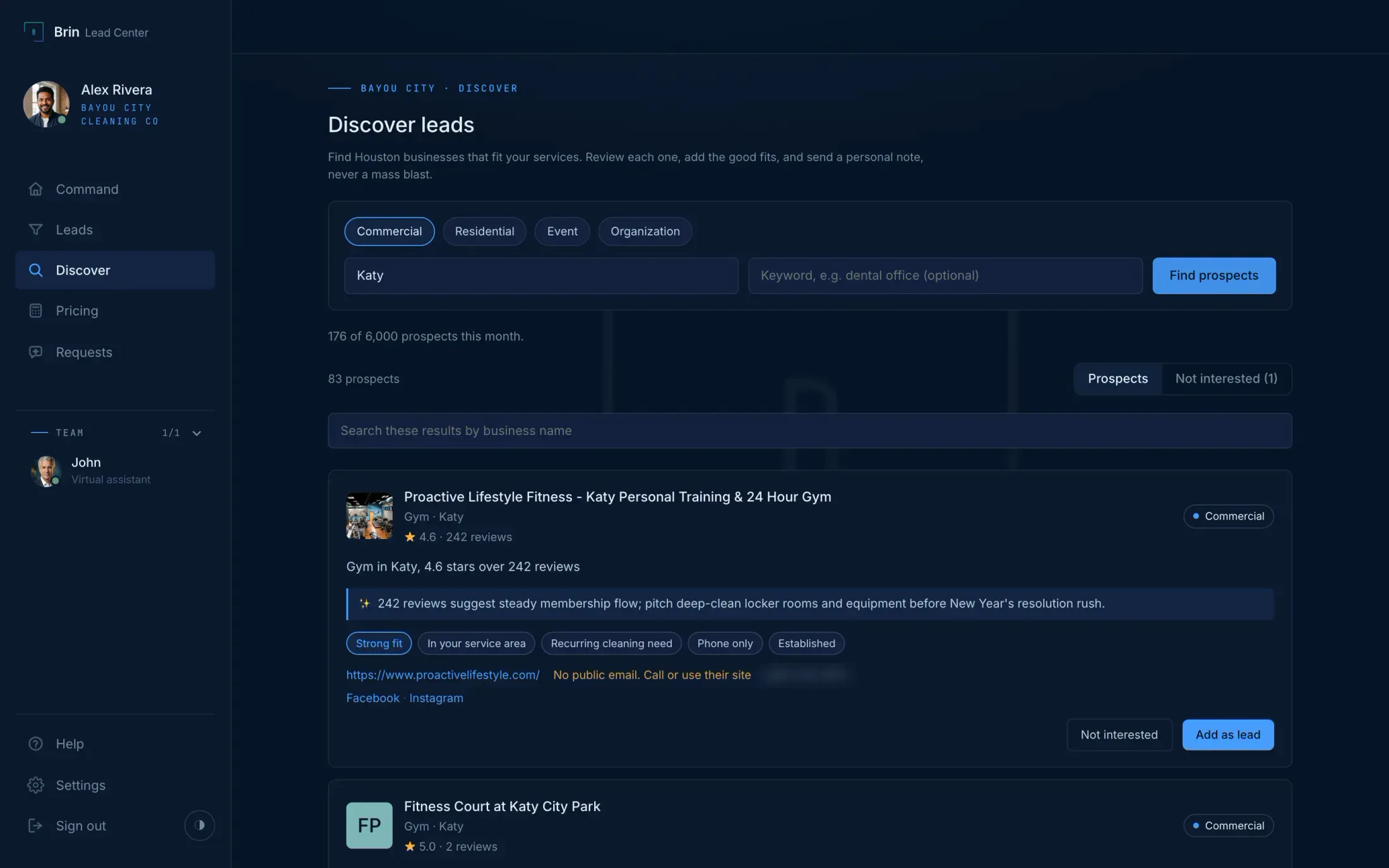
Discover
Find the Businesses You Sell To
Real businesses from Google Maps, with the website, the email found on it, and their Facebook, Instagram, and LinkedIn when they have them. One line on why each is worth a note, then Add as lead.
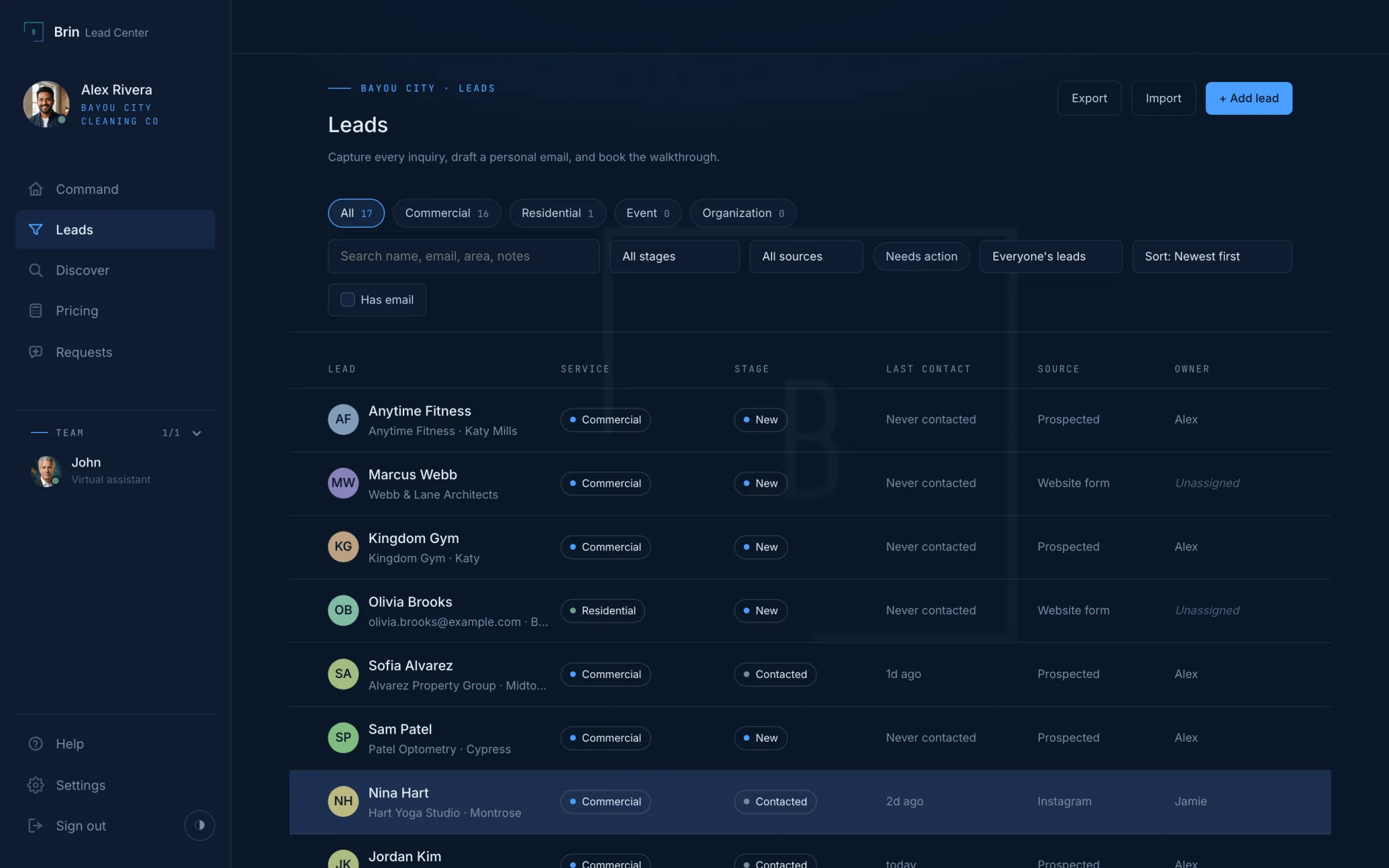
Leads
The Whole Pipeline, Searchable
Every lead with its stage, its last contact, where it came from, and who owns it. Paste a spreadsheet to bring your list in. Website inquiries land here on their own.
How it works
From a Name on a List to a Conversation
Discover
Search for businesses that match who you sell to, and pull the ones worth contacting into your pipeline.
Draft
AI researches each business and drafts an email specific to them, not a template with the name swapped in.
Approve and send
You read it, change anything you want, and send from your own business address.
Read the reply
Every reply lands on the lead's timeline already sorted: interested, wants a price, wants to schedule, has a question, or not interested. Anyone who stays quiet is followed up on schedule until they answer. A meeting lands on your Google Calendar with the prospect invited.
What you can do
One Workspace for the Whole Pipeline
- Discover prospects and pull them into your pipeline
- Keep every lead, its details, and its history in one place
- Draft personalized outreach with AI, in your own voice
- Review and edit every email before it sends
- Send from your own business address, so replies come back to you
- Every reply comes back classified: interested, wants a price, wants to schedule, has a question, or not interested
- Automatic follow-ups on a schedule that stop on reply, and you choose whether each one waits for your approval
- Inquiries from your website land in Leads, with the message
- Calendar booking: a meeting lands on your Google Calendar with the prospect invited
- Quotes from your own price sheet, sent from the lead
- A monthly report on the first: emails sent, replies, meetings booked, deals won
- Add your team. Each person works their own queue; a lead belongs to whoever reaches out first
Pricing
Two Plans, No Free Trial, a Real Guarantee
Pick a plan and start working. If it is not for you, cancel inside fourteen days from your own Plan page and every charge is refunded in full.
Lead Center
$149 / month
For an owner doing their own outreach.
- Everything in the plan: leads, drafting in your voice, follow-ups, calendar booking, quotes, the monthly report
- 2,000 Discover prospects a month
- Owner seat; add teammates at $49 each
- John available as an add-on
Lead Center Pro
$249 / month
For an owner with a team, and John on the team.
- Everything in Lead Center
- 6,000 Discover prospects a month
- Owner plus one seat included; more at $49 each
- John, your virtual assistant, in text and voice
Prospects beyond the monthly allowance: a prepaid pack of 1,000 for $5, and packs never expire. Founder codes apply at checkout while they last.
Sends responsibly
Your Name Is on Every Email
Cold email done badly gets a domain blacklisted and a business a complaint. The mechanics that keep that from happening are built in, not left as a checklist.
You also decide what the AI is allowed to say. What it says about price. How it answers the sensitive question in your industry. What it may never claim, checked before any email leaves.
- One-click unsubscribe and a postal address on every cold email.
- Someone who replies asking to stop is suppressed automatically, not left to memory.
- Permanent bounces are suppressed. Temporary ones are not, so a full mailbox does not lose you a prospect.
- A daily send cap per person while your domain earns its reputation.
- A list of claims the AI may never make, checked before every send.
Who it is for
Built for People Doing Their Own Outreach
Owner-operators and small teams running outbound themselves, from one person to a founder plus a couple of reps, without a full sales stack or an SDR to run it.
- Owner-operators doing their own outbound
- Small sales teams without an SDR
- Service businesses growing past referrals
- Anyone running outreach out of a spreadsheet
Questions
- Is there a free trial?
- No. Pick a plan, use it, and if it is not for you cancel inside fourteen days for a full refund, from your own Plan page, no questions.
- Does it send from my email address?
- Yes. Connect Gmail in one click, or send from your business domain by adding a short list of DNS records once. Replies come back to your normal inbox and onto the lead's timeline.
- Will it email people I did not approve?
- Every first email is drafted for you to read, edit, and approve. Follow-ups run on a sequence you turned on, in your voice, and stop the moment someone answers.
- What if I need more Discover prospects?
- Prospects are counted per calendar month. When the month is spent you add a prepaid pack of 1,000 for $5, and packs never expire.
- Can my team use it?
- Yes. Add someone from Settings, they get their own sign-in and their own queue, and a lead belongs to whoever reaches out first.
Get started
Get Your Outreach Out of the Spreadsheet
Your workspace is ready the moment you finish the form. Pick a plan inside, and if it is not for you, cancel within fourteen days for a full refund.
Would rather talk first? Book a call. Already a customer? Sign in.